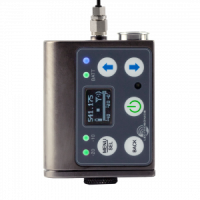
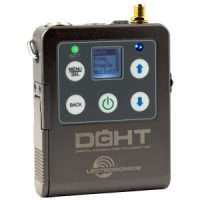
The DBSM and DBSMD digital transcorders were developed specifically for the needs of the film industry and offer time code jam sync capability. They offer hands free setup and adjustment using audible tones and can be put to sleep to conserve battery power during setup while buried inside costuming, then awakened for normal operation when the production begins. Other features include input gain adjustment in 1 dB increments over a 44 dB range and adjustable low frequency audio roll-off for 3 dB down points at 20, 35, 50, 70, 100, 120 or 150 Hz to control subsonic and very low frequency audio content. The transmitters also offer selectable output power of 10, 25 and 50 mW. A special high-density (HDM) transmit mode at 2 mW allows for ultra-tight channel spacing without concern for frequency coordination.
The input section features the unique Lectrosonics servo bias input circuitry with a standard TA5M type jack for use with electret lavaliere mics, dynamic mics, or line level signals. A DSP-controlled analog audio limiter is employed ahead of the first mic preamp to protect the entire audio chain from overload. The limiter has a range of more than 30 dB for excellent overload protection, and a dual release envelope that makes the limiter acoustically transparent while maintaining low distortion of brief transients and longer duration peaks.
A water resistant control panel with OLED, membrane switches and multi-color LEDs make input gain adjustments, frequency and compatibility mode selection quick and accurate. The battery compartment accepts industry-accepted AA batteries (lithium recommended).
The DBSM and DBSMD use the same accessories as the SMWB and SMDWB transmitters, specifically belt clips, pouches, and battery eliminators.
Included Accessories
- 1 – PSMDWB Pouch
- 2 – 35924 Foam Insulating Pads
- 1 – 55010 16GB Flash memory card
- 1 – 40073 AA LITHIUM
- 1 – AMMXX Antenna (Chart)
- 1 – SMKITTA5 Mic Connector Kit
- 1 – SMDWBBCSL Belt Clip w/instructions (unmounted)
- 1 – SM SILVER Paste
- 1 – Quick Start Guide
Accessories


Quick Start Guide
Data Sheet
Manual
Firmware updates are now available for users outside the United States to enable simultaneous recording and transmitting in non-U.S. models. Only the DBSM(D)/E01 and DBSM(D)/E09 models are eligible for this update.
If you are located outside of the United States or Canada, and your transmitter’s model number does not include /E01, or /E09, please email service.repair@lectrosonics.com or call 505-892-4501 for more details.
Users with existing units in Canada will be required to send their units, at their own expense, to the Lectrosonics Factory for the upgrade. To arrange for this, please email service.repair@lectrosonics.com or call 505-892-4501 for more details.
Below are links to the current firmware versions for the DBSM and DBSMD transmitters.
These are zip files: after downloading extract them into a temporary folder. Each contains 3 files, one for the microcontroller, one for the FPGA, and one bootloader file. Follow the instructions in the DBSM Instruction Manual to update firmware. If you have any questions or encounter problems while updating the firmware please contact the factory for assistance.
How do I decide which firmware version is right for my transmitter?
If you have an DBSM or DBSMD transmitter:
Note that simultaneous record and transmit is not available for users in the United States. If you have an DBSM or DBSMD and are located outside the United States, please contact the factory for assistance.
- If you have DBSM version 1.xx firmware, use only DBSM version 1.xx firmware, version 1.xx FPGA firmware, and boot loader version 2. These are bundled into a single file for download: dbsm_m108-f102-b2.zip.
- If you have DBSM version 2.xx firmware, use only DBSM version 2.xx firmware, version 2.xx FPGA firmware, and boot loader version 2. These are bundled into a single file for download: dbsm_m212-f201-b2.zip.
If you have an DBSM/E01 or DBSMD/E01 transmitter:
- If you have DBSM/E01 version 1.xx firmware, use only DBSM/E01 version 1.xx firmware, version 1.xx FPGA firmware, and boot loader version 2. These are bundled into a single file for download: dbsm_e01_m108-f102-b2.zip.
- If you have DBSM/E01 version 2.xx firmware, use only DBSM/E01 version 2.xx firmware, version 2.xx FPGA firmware, and boot loader version 2. These are bundled into a single file for download: dbsm_e01_m212-f201-b2.zip.
If you have an DBSM/E09 or DBSMD/E09 transmitter:
- If you have DBSM/E09 version 2.xx firmware, use only DBSM/E09 version 2.xx firmware, version 2.xx FPGA firmware, and boot loader version 2. These are bundled into a single file for download: dbsm_e09_m212-f201-b2.zip.
Firmware download files include a bootloader file. You don’t need to install this if your installed bootloader is the current version.The bootloader version is displayed when you enter firmware update mode. To do this, press and hold the UP and DOWN arrow buttons, then press the power button to turn the transmitter on. The bootloader version appears at the top of the screen, for example “DBSM-BL2”.
DBSMD Firmware History
DBSM v2.12 (SUPER)/v2.01 (FPGA)/v2 (BOOT)
- Changes for ease of manufacturing. No new features.
DBSM v2.11 (SUPER)/v2.01 (FPGA)/v2 (BOOT)
- Changes for ease of manufacturing. No new features.
DBSM v1.08 (SUPER)/v1.02 (FPGA)/v2 (BOOT)
- Changes for ease of manufacturing. No new features.
DBSM v2.10 (SUPER)/v2.00 (FPGA)/v2 (BOOT)
- Fix timing problem causing intermittent “write error” messages when formatting an SD card.
DBSM v2.08 (SUPER)/v2.00 (FPGA)/v2 (BOOT)- Force recording to stop when SD card is full.
- Ignore the ‘LED Off’ setting and wake up the display when powering off.
DBSM v2.04 (SUPER)/v2.00 (FPGA)/v2 (BOOT)- Added a special “Dark” locked mode, which prevents the display from lighting up when buttons are pressed. Exit this mode by holding UP+DOWN for 3 seconds. Unlike the regular locked mode, “Dark” locked mode does not persist through a power cycle.
DBSM v1.07 (SUPER)/v1.01 (FPGA)/v2 (BOOT)- Added a special “Dark” locked mode, which prevents the display from lighting up when buttons are pressed. Exit this mode by holding UP+DOWN for 3 seconds. Unlike the regular locked mode, “Dark” locked mode does not persist through a power cycle.
DBSM v2.02 (SUPER)/v2.00 (FPGA)/v2 (BOOT)- Fixed bug when using dweedle tones to set a negative mic gain level. The momentary confirmation screen that follows displayed a corrupted gain value, even though the gain was updated successfully.
- Note: this version for use only with:
- DBSM serial number 630 and higher
- DBSMD serial number 591 and higher
Version 2.xx firmware is not compatible with earlier units. Use version 1.xx firmware for those.
DBSM v1.05 (SUPER)/v1.01 (FPGA)/v2 (BOOT)- Fixed bug when using dweedle tones to set a negative mic gain level. The momentary confirmation screen that follows displayed a corrupted gain value, even though the gain was updated successfully.
- Wipe Key operation now returns to IR&Keys menu on completion.
DBSM v2.00 (SUPER)/v2.00 (FPGA)/v2 (BOOT)- “Wipe Key” operation now returns to IR&Keys menu on completion.
- Note: this version for use only with:
- DBSM serial number 630 and higher
- DBSMD serial number 591 and higher
Version 2.xx firmware is not compatible with earlier units. Use version 1.xx firmware for those.
DBSM v1.04 (SUPER)/v1.01 (FPGA)/v2 (BOOT)- Fix bug sometimes causing user interface to “freeze” sometimes although the unit is still transmitting normally.
- Improved reliability of “auto-on” feature.
- Now, while issuing one-time prompt for battery configuration, SD card detection is deferred until after prompt is answered.
DBSM v1.03 (SUPER)/v1.01 (FPGA)/v2 (BOOT)- Battery percentage reporting is now more accurate. This improved accuracy requires that the transmitter know whether it is a one-battery or two-battery model. New transmitters in the DBSM family will be pre-programmed at the factory with the number of batteries for each particular model. However, existing units receiving a firmware upgrade will have to be manually set for one or two batteries. Please follow these instructions:
- At the first power-on after installing the new firmware, a one-time “#Batts?” prompt is issued. The choices are “1xAA” and “2xAA”, neither of which is selected by default. Use the arrow keys to make the choice, then press the MENU/SEL key. A confirmation screen then appears. If the wrong choice was made, it is possible at this point to press BACK to return to the original prompt and correct it. If the right number of batteries appears on the confirmation screen, the arrow keys should be used to select “Yes”. Press the MENU/SEL key to finish and dismiss the screen.
- Menu cursor positions are now remembered in all menus and submenus, and are only reset at power-on or when the “Defaults” menu option is executed.
- “Auto on” feature now works after unit shuts down due to critically low battery voltage.
DBSM v1.01 (SUPER)/v1.00 (FPGA)/v2 (BOOT)- Fixed bug that could cause encryption system failure / loss of audio in certain circumstances.
DBSM v1.00 (SUPER)/v1.00 (FPGA)/v2 (BOOT)- Initial production release.
- Added a special “Dark” locked mode, which prevents the display from lighting up when buttons are pressed. Exit this mode by holding UP+DOWN for 3 seconds. Unlike the regular locked mode, “Dark” locked mode does not persist through a power cycle.
DBSM v1.07 (SUPER)/v1.01 (FPGA)/v2 (BOOT)- Added a special “Dark” locked mode, which prevents the display from lighting up when buttons are pressed. Exit this mode by holding UP+DOWN for 3 seconds. Unlike the regular locked mode, “Dark” locked mode does not persist through a power cycle.
DBSM v2.02 (SUPER)/v2.00 (FPGA)/v2 (BOOT)- Fixed bug when using dweedle tones to set a negative mic gain level. The momentary confirmation screen that follows displayed a corrupted gain value, even though the gain was updated successfully.
- Note: this version for use only with:
- DBSM serial number 630 and higher
- DBSMD serial number 591 and higher
Version 2.xx firmware is not compatible with earlier units. Use version 1.xx firmware for those.
DBSM v1.05 (SUPER)/v1.01 (FPGA)/v2 (BOOT)- Fixed bug when using dweedle tones to set a negative mic gain level. The momentary confirmation screen that follows displayed a corrupted gain value, even though the gain was updated successfully.
- Wipe Key operation now returns to IR&Keys menu on completion.
DBSM v2.00 (SUPER)/v2.00 (FPGA)/v2 (BOOT)- “Wipe Key” operation now returns to IR&Keys menu on completion.
- Note: this version for use only with:
- DBSM serial number 630 and higher
- DBSMD serial number 591 and higher
Version 2.xx firmware is not compatible with earlier units. Use version 1.xx firmware for those.
DBSM v1.04 (SUPER)/v1.01 (FPGA)/v2 (BOOT)- Fix bug sometimes causing user interface to “freeze” sometimes although the unit is still transmitting normally.
- Improved reliability of “auto-on” feature.
- Now, while issuing one-time prompt for battery configuration, SD card detection is deferred until after prompt is answered.
DBSM v1.03 (SUPER)/v1.01 (FPGA)/v2 (BOOT)- Battery percentage reporting is now more accurate. This improved accuracy requires that the transmitter know whether it is a one-battery or two-battery model. New transmitters in the DBSM family will be pre-programmed at the factory with the number of batteries for each particular model. However, existing units receiving a firmware upgrade will have to be manually set for one or two batteries. Please follow these instructions:
- At the first power-on after installing the new firmware, a one-time “#Batts?” prompt is issued. The choices are “1xAA” and “2xAA”, neither of which is selected by default. Use the arrow keys to make the choice, then press the MENU/SEL key. A confirmation screen then appears. If the wrong choice was made, it is possible at this point to press BACK to return to the original prompt and correct it. If the right number of batteries appears on the confirmation screen, the arrow keys should be used to select “Yes”. Press the MENU/SEL key to finish and dismiss the screen.
- Menu cursor positions are now remembered in all menus and submenus, and are only reset at power-on or when the “Defaults” menu option is executed.
- “Auto on” feature now works after unit shuts down due to critically low battery voltage.
DBSM v1.01 (SUPER)/v1.00 (FPGA)/v2 (BOOT)- Fixed bug that could cause encryption system failure / loss of audio in certain circumstances.
DBSM v1.00 (SUPER)/v1.00 (FPGA)/v2 (BOOT)- Initial production release.
- Fixed bug when using dweedle tones to set a negative mic gain level. The momentary confirmation screen that follows displayed a corrupted gain value, even though the gain was updated successfully.
- Note: this version for use only with:
- DBSM serial number 630 and higher
- DBSMD serial number 591 and higher
Version 2.xx firmware is not compatible with earlier units. Use version 1.xx firmware for those.
DBSM v1.05 (SUPER)/v1.01 (FPGA)/v2 (BOOT)- Fixed bug when using dweedle tones to set a negative mic gain level. The momentary confirmation screen that follows displayed a corrupted gain value, even though the gain was updated successfully.
- Wipe Key operation now returns to IR&Keys menu on completion.
DBSM v2.00 (SUPER)/v2.00 (FPGA)/v2 (BOOT)- “Wipe Key” operation now returns to IR&Keys menu on completion.
- Note: this version for use only with:
- DBSM serial number 630 and higher
- DBSMD serial number 591 and higher
Version 2.xx firmware is not compatible with earlier units. Use version 1.xx firmware for those.
DBSM v1.04 (SUPER)/v1.01 (FPGA)/v2 (BOOT)- Fix bug sometimes causing user interface to “freeze” sometimes although the unit is still transmitting normally.
- Improved reliability of “auto-on” feature.
- Now, while issuing one-time prompt for battery configuration, SD card detection is deferred until after prompt is answered.
DBSM v1.03 (SUPER)/v1.01 (FPGA)/v2 (BOOT)- Battery percentage reporting is now more accurate. This improved accuracy requires that the transmitter know whether it is a one-battery or two-battery model. New transmitters in the DBSM family will be pre-programmed at the factory with the number of batteries for each particular model. However, existing units receiving a firmware upgrade will have to be manually set for one or two batteries. Please follow these instructions:
- At the first power-on after installing the new firmware, a one-time “#Batts?” prompt is issued. The choices are “1xAA” and “2xAA”, neither of which is selected by default. Use the arrow keys to make the choice, then press the MENU/SEL key. A confirmation screen then appears. If the wrong choice was made, it is possible at this point to press BACK to return to the original prompt and correct it. If the right number of batteries appears on the confirmation screen, the arrow keys should be used to select “Yes”. Press the MENU/SEL key to finish and dismiss the screen.
- Menu cursor positions are now remembered in all menus and submenus, and are only reset at power-on or when the “Defaults” menu option is executed.
- “Auto on” feature now works after unit shuts down due to critically low battery voltage.
DBSM v1.01 (SUPER)/v1.00 (FPGA)/v2 (BOOT)- Fixed bug that could cause encryption system failure / loss of audio in certain circumstances.
DBSM v1.00 (SUPER)/v1.00 (FPGA)/v2 (BOOT)- Initial production release.
- “Wipe Key” operation now returns to IR&Keys menu on completion.
- Note: this version for use only with:
- DBSM serial number 630 and higher
- DBSMD serial number 591 and higher
Version 2.xx firmware is not compatible with earlier units. Use version 1.xx firmware for those.
DBSM v1.04 (SUPER)/v1.01 (FPGA)/v2 (BOOT)- Fix bug sometimes causing user interface to “freeze” sometimes although the unit is still transmitting normally.
- Improved reliability of “auto-on” feature.
- Now, while issuing one-time prompt for battery configuration, SD card detection is deferred until after prompt is answered.
DBSM v1.03 (SUPER)/v1.01 (FPGA)/v2 (BOOT)- Battery percentage reporting is now more accurate. This improved accuracy requires that the transmitter know whether it is a one-battery or two-battery model. New transmitters in the DBSM family will be pre-programmed at the factory with the number of batteries for each particular model. However, existing units receiving a firmware upgrade will have to be manually set for one or two batteries. Please follow these instructions:
- At the first power-on after installing the new firmware, a one-time “#Batts?” prompt is issued. The choices are “1xAA” and “2xAA”, neither of which is selected by default. Use the arrow keys to make the choice, then press the MENU/SEL key. A confirmation screen then appears. If the wrong choice was made, it is possible at this point to press BACK to return to the original prompt and correct it. If the right number of batteries appears on the confirmation screen, the arrow keys should be used to select “Yes”. Press the MENU/SEL key to finish and dismiss the screen.
- Menu cursor positions are now remembered in all menus and submenus, and are only reset at power-on or when the “Defaults” menu option is executed.
- “Auto on” feature now works after unit shuts down due to critically low battery voltage.
DBSM v1.01 (SUPER)/v1.00 (FPGA)/v2 (BOOT)- Fixed bug that could cause encryption system failure / loss of audio in certain circumstances.
DBSM v1.00 (SUPER)/v1.00 (FPGA)/v2 (BOOT)- Initial production release.
- Battery percentage reporting is now more accurate. This improved accuracy requires that the transmitter know whether it is a one-battery or two-battery model. New transmitters in the DBSM family will be pre-programmed at the factory with the number of batteries for each particular model. However, existing units receiving a firmware upgrade will have to be manually set for one or two batteries. Please follow these instructions:
- At the first power-on after installing the new firmware, a one-time “#Batts?” prompt is issued. The choices are “1xAA” and “2xAA”, neither of which is selected by default. Use the arrow keys to make the choice, then press the MENU/SEL key. A confirmation screen then appears. If the wrong choice was made, it is possible at this point to press BACK to return to the original prompt and correct it. If the right number of batteries appears on the confirmation screen, the arrow keys should be used to select “Yes”. Press the MENU/SEL key to finish and dismiss the screen.
- Menu cursor positions are now remembered in all menus and submenus, and are only reset at power-on or when the “Defaults” menu option is executed.
- “Auto on” feature now works after unit shuts down due to critically low battery voltage.
DBSM v1.01 (SUPER)/v1.00 (FPGA)/v2 (BOOT)- Fixed bug that could cause encryption system failure / loss of audio in certain circumstances.
DBSM v1.00 (SUPER)/v1.00 (FPGA)/v2 (BOOT)- Initial production release.
- Initial production release.
DBSMD/E01 Firmware History
DBSM/E01 v2.12 (SUPER)/v2.01 (FPGA)/v2 (BOOT)
- Changes for ease of manufacturing. No new features.
DBSM/E01 v2.11 (SUPER)/v2.01 (FPGA)/v2 (BOOT)
- Allows transmitting audio while recording.
DBSM/E01 v1.08 (SUPER)/v1.02 (FPGA)/v2 (BOOT)
- Allows transmitting audio while recording.
DBSM/E01 v2.10 (SUPER)/v2.00 (FPGA)/v2 (BOOT)
- Fix timing problem causing intermittent “write error” messages when formatting an SD card.
DBSM/E01 v2.08 (SUPER)/v2.00 (FPGA)/v2 (BOOT)
- Force recording to stop when SD card is full.
- Ignore the ‘LED Off’ setting and wake up the display when powering off.
DBSM/E01 v2.04 (SUPER)/v2.00 (FPGA)/v2 (BOOT)
- Added a special “Dark” locked mode, which prevents the display from lighting up when buttons are pressed. Exit this mode by holding UP+DOWN for 3 seconds. Unlike the regular locked mode, “Dark” locked mode does not persist through a power cycle.
DBSM/E01 v1.07 (SUPER)/v1.01 (FPGA)/v2 (BOOT)
- Added a special “Dark” locked mode, which prevents the display from lighting up when buttons are pressed. Exit this mode by holding UP+DOWN for 3 seconds. Unlike the regular locked mode, “Dark” locked mode does not persist through a power cycle.
DBSM/E01 v2.02 (SUPER)/v2.00 (FPGA)/v2 (BOOT)
- Fixed bug when using dweedle tones to set a negative mic gain level. The momentary confirmation screen that follows displayed a corrupted gain value, even though the gain was updated successfully.
- Note: this version for use only with:
- DBSM/E01 serial number 191 and higher
- DBSMD/E01 serial number 196 and higher
Version 2.xx firmware is not compatible with earlier units. Use version 1.xx firmware for those.
DBSM/E01 v1.05 (SUPER)/v1.01 (FPGA)/v2 (BOOT)
- Fixed bug when using dweedle tones to set a negative mic gain level. The momentary confirmation screen that follows displayed a corrupted gain value, even though the gain was updated successfully.
- Wipe Key operation now returns to IR&Keys menu on completion.
DBSM/E01 v2.00 (SUPER)/v2.00 (FPGA)/v2 (BOOT)
- “Wipe Key” operation now returns to IR&Keys menu on completion.
- Note: this version for use only with:
- DBSM/E01 serial number 191 and higher
- DBSMD/E01 serial number 196 and higher
Version 2.xx firmware is not compatible with earlier units. Use version 1.xx firmware for those.
DBSM/E01 v1.04 (SUPER)/v1.01 (FPGA)/v2 (BOOT)
- Fix bug sometimes causing user interface to “freeze” sometimes although the unit is still transmitting normally.
- Improved reliability of “auto-on” feature.
- Now, while issuing one-time prompt for battery configuration, SD card detection is deferred until after prompt is answered.
DBSM/E01 v1.03 (SUPER)/v1.01 (FPGA)/v2 (BOOT)
- Battery percentage reporting is now more accurate. This improved accuracy requires that the transmitter know whether it is a one-battery or two-battery model. New transmitters in the DBSM family will be pre-programmed at the factory with the number of batteries for each particular model. However, existing units receiving a firmware upgrade will have to be manually set for one or two batteries. Please follow these instructions:
- At the first power-on after installing the new firmware, a one-time “#Batts?” prompt is issued. The choices are “1xAA” and “2xAA”, neither of which is selected by default. Use the arrow keys to make the choice, then press the MENU/SEL key. A confirmation screen then appears. If the wrong choice was made, it is possible at this point to press BACK to return to the original prompt and correct it. If the right number of batteries appears on the confirmation screen, the arrow keys should be used to select “Yes”. Press the MENU/SEL key to finish and dismiss the screen.
DBSM/E01 v1.01 (SUPER)/v1.00 (FPGA)/v1.02/v2 (BOOT)
- Fixed bug that could cause encryption system failure / loss of audio in certain circumstances.
DBSM/E01 v1.00 (SUPER)/v1.00 (FPGA)/v2 (BOOT)
- Initial production release.
Awards & Reviews